
Your water purifier, live on your phone.
Every York system comes with its own customer portal. No signup form, no passwords — your account is created automatically the moment you order, and everything about your water purifier lives there.
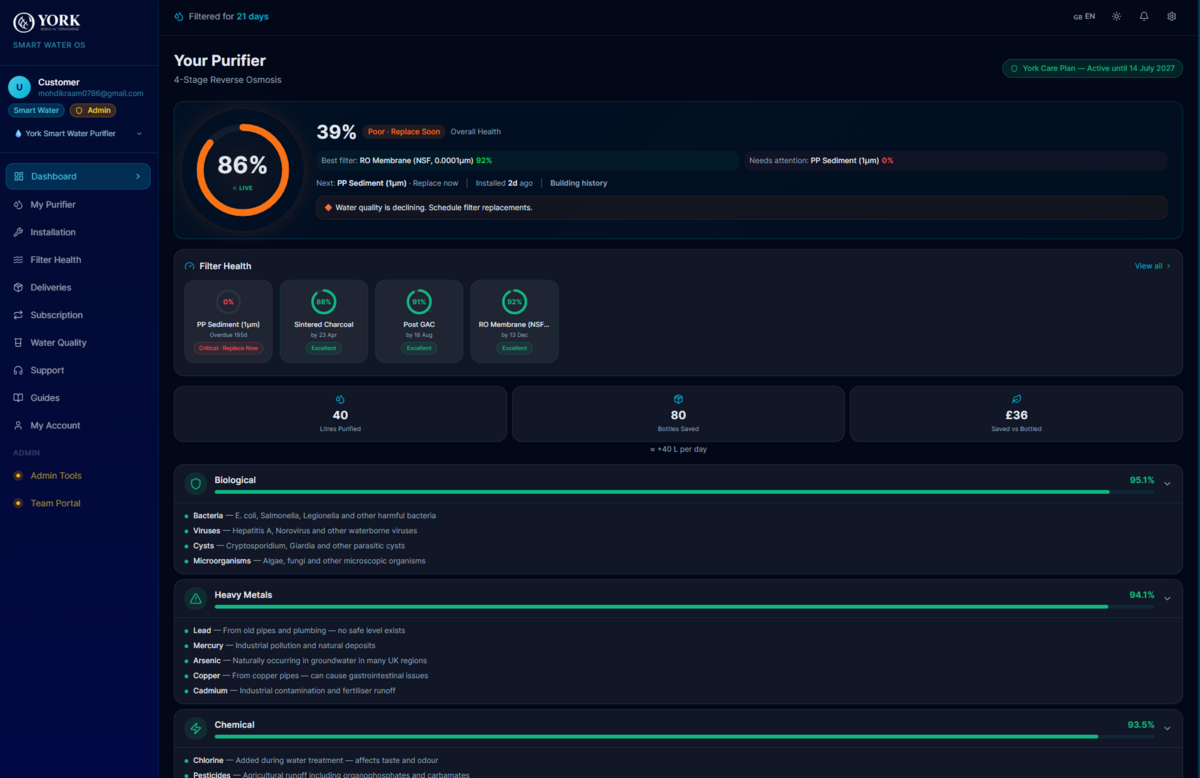
Everything, in one place.
Live filter health
Every filter stage tracked individually with a health percentage and an exact replace-by date — so nothing is guesswork and nothing gets forgotten.
Download York App monitoring
A digital twin of your system showing reduction across biological, heavy metal, chemical and physical contaminants, plus quality trends over time.
Delivery tracking
Mirrors real fulfilment events end to end — in transit, out for delivery, delivered — with a collection flow for pickup orders.
Installation booking
Once delivered, book your free installation in three slots: 09:00–11:30, 12:30–15:00 or 15:30–18:00, on the day that suits you.
Live engineer ETA
On installation day you follow your engineer's journey in real time, with a live arrival estimate — no waiting in all morning.
One-tap filter reorder
When a filter is due, order the exact cartridge with a prefilled checkout. Track it, then confirm the fit — the clock resets automatically.
Impact stats
Litres purified, plastic bottles saved and money saved versus bottled water — updated continuously.
Invoices & documents
Branded invoices available to download any time, in your order's own currency, alongside your warranty record.
Support built in
Raise a support request from inside the portal and track it through to resolution, with your water purifier's history attached.
From order to live monitoring.
You order
Your account and water purifier record are created automatically from your order. No signup form to fill in.
Sign in with a code
Enter your email and we send a one-time code. No passwords to remember or reset.
Track and book
Follow delivery, then book your free installation the moment your water purifier arrives.
Your twin wakes
Shortly after installation completes, calibration finishes and live filter health and water quality begin reporting.
Filters and installs, handled.
Care Plan members receive replacement filters at no cost and free installations, managed entirely through the portal.
One app, from order to every filter after.
Buy a York water purifier and the app opens itself. No sign-up form — your account exists the moment you order, and everything that happens next happens here.
-
Step 1
You order
Buy a water purifier outright or on a plan. Your account and your purifier record are created automatically — there is no sign-up form to fill in.
No sign-up needed -
Step 2
Track the delivery
Follow the real fulfilment events end to end, from despatch to the moment it reaches your door.
Live -
Step 3
Book your installation
Pick a date and slot in the app. No phone call needed. Reschedule or cancel in the app too, with at least 24 hours' notice.
In-app booking -
Step 4
Track your engineer
On the day you follow your YORK-certified engineer's live ETA, the same way you would track a delivery driver.
Live ETA -
Step 5
Fitted and calibrated
The engineer installs the water purifier under your sink with a dedicated tap, calibrates it, and you sign the job off in the app.
Free installation -
Step 6
Filter life starts
Every stage is tracked individually with a live percentage — bacteria, heavy metals, limescale and chlorine reduction, and overall water health.
Per-stage health -
Step 7
Cartridges arrive before they are due
As filter life drops, the next cartridge is despatched and tracked in the app. Fit it yourself, or book an engineer to do it.
Self-fit or book -
Step 8
Support without leaving the app
Live chat, a call back, or a service request — raised from inside the app against your own water purifier, so nobody asks you for a serial number.
Chat and call